
 Google Calendar
  Outlook Calendar
  Google Meet
  Microsoft Teams
  Zoom Meetings
 How to Keep Appointment Details Private When Syncing Your Calendar (And Why Calendly Falls Short)
Calendly users are frustrated that client appointment details show up on shared Google Calendars. Learn how CalendHub's built-in Privacy Mode solves this in one toggle, with no workarounds needed.
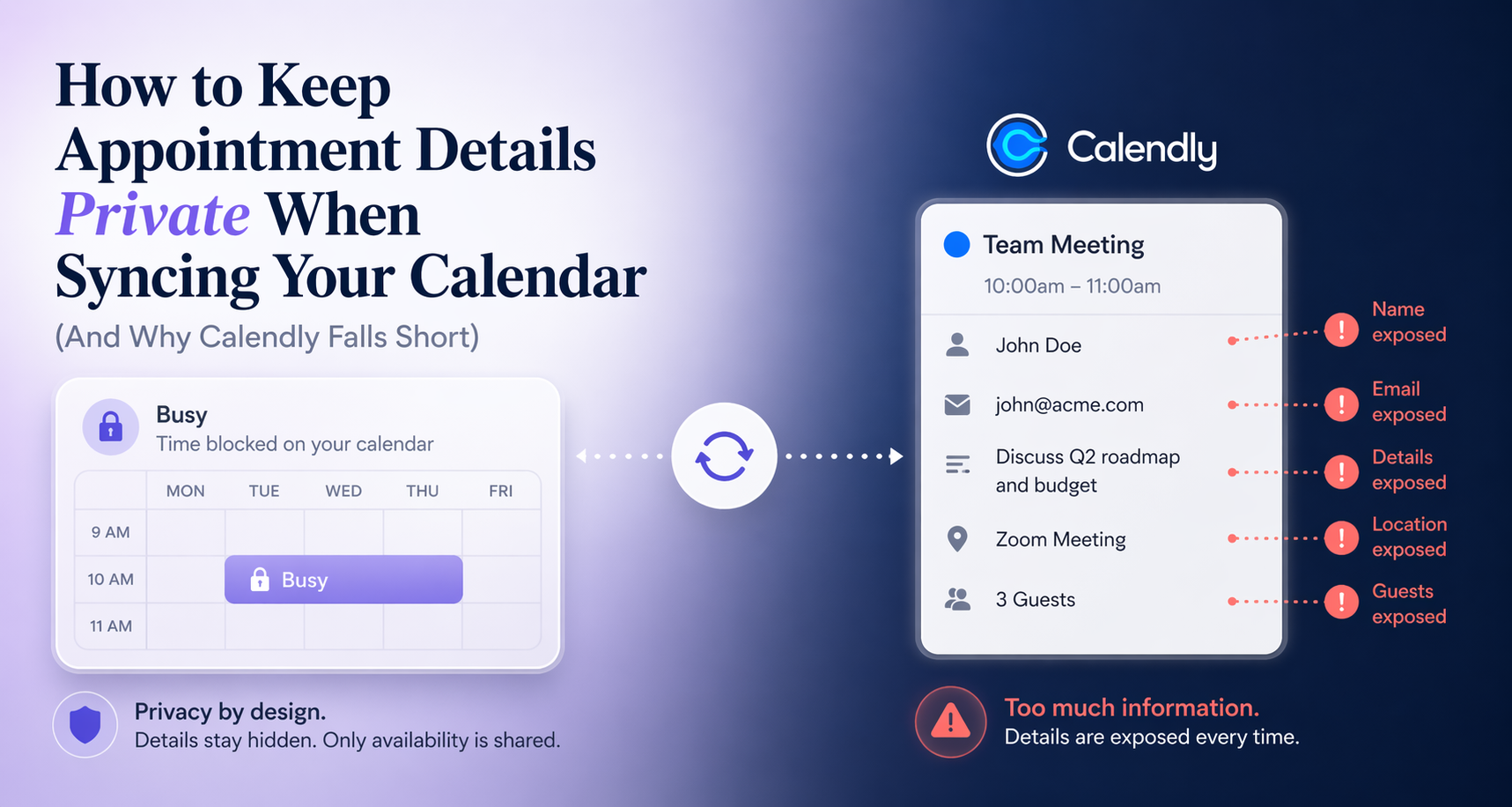
The Problem Thousands of Professionals Are Quietly Dealing With
Imagine this. You're a therapist, a consultant, or a freelancer working from home. You use Calendly to manage your client bookings, and you've set up a sync with your personal Google Calendar to keep everything in one place. Convenient, right?
Then one day you realize your spouse, your assistant, or a family member who shares your Google Calendar can see every client's name, appointment type, and session notes right there in the calendar feed.
This exact scenario surfaces repeatedly on the Calendly community forum, where one user wrote:
"I want my spouse to just see that I'm busy, and not see my Calendly event details (customer's name, etc.)... my prior calendar app (Acuity/Square) allowed this functionality with a setting."
The response from a Calendly community moderator was honest but deflating. Calendly doesn't offer this as a built-in feature. The workaround? Create a second Google Calendar, set it to private, re-route your sync, and hope it all stays in sync. It's a multi-step process that shouldn't be necessary in 2026.
This is a real privacy gap, and it matters more than most people realize.
Why Calendar Privacy Isn't Just About Comfort
When client names, session types, or appointment details leak onto a shared calendar, the consequences can be serious.
- Client confidentiality is compromised. Therapists, coaches, lawyers, and healthcare providers have professional obligations to keep client information private.
- GDPR and data privacy laws apply. In Europe and many other jurisdictions, handling someone else's personal information without appropriate controls (even just their name on a calendar) is a compliance risk.
- Personal and professional boundaries blur. Even in less regulated professions, having a spouse, business partner, or assistant see the full details of every meeting is an overstep most people want to avoid.
Professionals who schedule personal events on shared work or family calendars consistently report that privacy controls are the single feature that decides whether calendar sync is a productivity win or an ongoing source of friction. The calendar tool you use determines whether those controls are easy or a manual headache.
What Calendly Offers (And What It Doesn't)
Calendly is one of the most popular scheduling tools on the market. It does a lot of things well: clean booking pages, automated reminders, Zoom link generation, and broad calendar connectivity. But when it comes to granular privacy controls on synced events, Calendly has a significant gap.
As confirmed in the community forum, Calendly syncs appointment details, including attendee names and event descriptions, directly to whichever Google Calendar you've connected. There is no toggle to say, "Sync availability, but hide the details."
The platform caps connected calendars at six on paid plans, and it does not expose privacy-level settings per calendar or per event type. If you want to hide client names from a shared calendar, the official advice is a multi-step workaround involving a separate Google Calendar, manual privacy settings, and careful re-routing of your sync.
That's not a feature. That's a patch.
How CalendHub Solves This Natively with Privacy Mode
CalendHub was built for professionals who need real control over their calendar data, not workarounds.
The platform includes a dedicated Privacy Mode that solves this problem in a single configuration step.
What Privacy Mode Does
When Privacy Mode is enabled, synced events are transmitted to other calendars as generic "Busy" blocks (or any custom title you choose). That's it. No client names. No meeting titles. No descriptions or location data.
Your availability is accurately reflected, so there are no double bookings and no scheduling gaps. But the content of each appointment stays completely private.
Need better calendar management? CalendHub unifies all your calendars with smart scheduling and video conferencing.
Privacy Mode is useful whether you're syncing between a work calendar and a personal calendar, a client-facing calendar and a shared family calendar, or any combination of connected accounts.
Configuring Privacy Mode in CalendHub
Setting this up takes about a minute.
- Connect your calendars via OAuth (Google, Outlook/Office 365, iCloud, or CalDAV, with no passwords stored).
- Open your user preferences and find the Calendar Privacy section.
- Enable Privacy Mode and optionally set the replacement title you want to show on synced calendars (the default is "Busy").
- Save. Going forward, synced events from that calendar appear as "Busy" (or your chosen title) on the target calendar.
You retain full visibility of all event details on your own CalendHub dashboard. Everyone else sees only that you're unavailable.
Privacy Mode in Real-World Scenarios
Here's how Privacy Mode handles the situations that catch Calendly users off guard.
| Scenario | Without Privacy Mode | With CalendHub Privacy Mode |
|---|---|---|
| Spouse shares your Google Calendar | Sees client names and appointment types | Sees only "Busy" blocks |
| Assistant manages your schedule | Has access to confidential meeting details | Sees when you're available, nothing more |
| Business partner views your calendar | Can read all meeting descriptions | Cannot access private event details |
| Team calendar visibility at work | Personal appointments fully visible | Personal time shows as blocked, no details |
| Client A's calendar synced to master | Can theoretically see Client B's details | Only availability data crosses over |
Beyond Privacy: Why CalendHub Removes the Workarounds Entirely
The Calendly community's suggested workaround (create a second calendar, configure it as private, share it selectively) is a symptom of a deeper issue. When a scheduling tool doesn't support privacy natively, users have to build their own systems around its limitations.
CalendHub takes a different approach. Privacy controls are built into the sync layer itself, not bolted on afterward. This means:
- No secondary calendar management. You don't need extra calendars just to achieve basic privacy. One calendar, configured correctly, does the job.
- Unlimited calendar connections. Unlike Calendly's six-calendar cap, CalendHub supports as many connected calendars as you need. Whether you manage three calendars or thirty, you aren't boxed in by arbitrary plan limits.
- Flexible configuration. Privacy Mode is configurable at the level that makes sense for how you work, not a rigid global switch with no granularity.
- Bidirectional sync with privacy intact. Changes in any calendar propagate across all connected calendars in near real time. Deletions, updates, and new events all sync, without Privacy Mode ever being bypassed.
Who Needs Calendar Privacy Mode Most
Privacy Mode isn't a niche feature. It's essential infrastructure for a wide range of professionals.
Healthcare and Wellness Providers Therapists, coaches, dietitians, and other wellness practitioners handle sensitive client information. Client names appearing on a shared calendar, even a family calendar, is a meaningful confidentiality risk. Privacy Mode closes that gap without any extra workflow.
Legal and Financial Professionals Lawyers, accountants, and advisors schedule consultations that may be inherently confidential. Keeping those details off shared calendars is standard practice, and should be automatic.
Freelancers and Consultants When you manage multiple client accounts, confidentiality runs both directions. Client A shouldn't see Client B's information, and your personal time shouldn't bleed into client-facing views. CalendHub's Privacy Mode handles both.
Home-Based Businesses When your work and personal life share physical space, calendars often end up shared too. Privacy Mode maintains the professional boundary even when everything else overlaps.
Executives and Team Leaders Senior leaders often manage personal, professional, and board-level calendars simultaneously. CalendHub's privacy controls let them sync availability across all of them while keeping sensitive meeting details in the appropriate context only.
The Bigger Picture
If you've searched for "keep Calendly appointments private on Google Calendar" or "hide client details from shared calendar," you've probably found forum threads, workarounds, and partial solutions. The demand for this functionality is real, and largely unmet by the tools that have historically dominated the scheduling market.
CalendHub exists precisely at this intersection. It's powerful enough for professionals with complex calendar needs, and private enough to handle sensitive client data without manual configuration tricks.
The shift toward remote work, shared family calendars, and multi-device scheduling means calendar privacy will only become more important over time. Tools that treat it as an afterthought will continue generating community forum threads asking for workarounds. Tools that build it in natively will keep those professionals' data, and their clients' trust, intact.
How to Get Started with CalendHub Privacy Mode
Switching to CalendHub from Calendly takes about five minutes. The platform connects to all major calendar providers via OAuth and begins syncing immediately. Privacy Mode is available to configure as soon as your calendars are connected.
For professionals who have been frustrated by Calendly's privacy limitations, or who haven't realized yet that their clients' names are visible to anyone who shares their Google Calendar, CalendHub offers the clean, configurable solution that should have been there from the start.
Start your free trial at CalendHub
Frequently Asked Questions
Does Privacy Mode work with Google Calendar and Outlook? Yes. CalendHub's Privacy Mode works across all supported platforms including Google Calendar, Microsoft Outlook/Office 365, iCloud Calendar, and CalDAV-compatible calendars.
Can I customize what the hidden events show up as? Yes. The default replacement title is "Busy," but you can set a custom title in your user preferences so synced events appear with a label of your choice on shared calendars.
Will my availability still be accurate when Privacy Mode is enabled? Completely. CalendHub syncs the time block with your chosen replacement title, so double-booking is prevented and your availability is accurately reflected everywhere. Only the event details are hidden.
Does CalendHub still have a calendar connection limit like Calendly's six-calendar cap? No. CalendHub is designed for professionals who manage many calendars, such as consultants, executives, and agencies, without the arbitrary six-calendar cap that forces Calendly users onto workarounds.
Is my calendar data secure in CalendHub? CalendHub uses encrypted connections, OAuth-only authentication with no passwords stored, and is built with GDPR obligations in mind. Calendar data is never shared with third parties.
Last updated: April 2026. CalendHub features and Calendly community forum content referenced above are accurate as of this publication date.
Ready to Simplify Your Schedule?
Join thousands of professionals who have unified their calendars and reclaimed their time with CalendHub's intelligent scheduling platform.
Related Articles
How 5 Professionals Solved the Calendly 6 Calendar Limit and Reclaimed Their Time
Real stories from consultants, entrepreneurs, and executives who hit Calendly's 6-calendar limit and found permanent solutions that eliminated scheduling chaos.

Calendly 6 Calendar Limit: The Permanent Solution for 2025
Calendly's 6-calendar limit forces professionals to choose which calendars to exclude. Discover the permanent solution that eliminates scheduling limits.
Calendly Alternative for Consultants: Unlimited Calendars for Multiple Clients
Consultants managing 8+ client calendars cannot use Calendly's 6-calendar limit. CalendHub provides unlimited calendar connections built for multi-client consulting.